
Build an ASMR Tower Worlds and Publishing Guide
Publish a playable tower, test it for visitors, use the Worlds board to visit and favorite builds, and keep later painting and event features in scope.
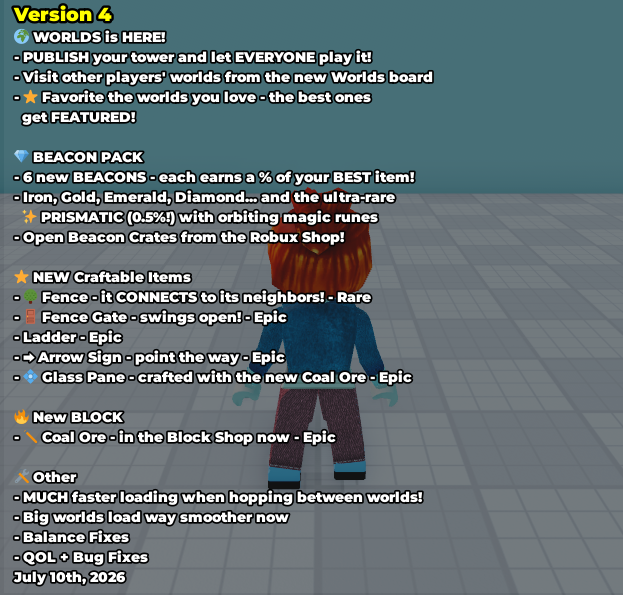
Version 4 officially introduced Worlds. The mechanics below come from the in-game Update Logs; route-design recommendations are practical advice and are not presented as secret game rules.
Publish and visit Worlds
Version 4 let players publish a tower and let everyone play it. The new Worlds board also provided a way to visit other players' worlds. Publishing changes the audience for a build: an owner who already knows every jump may overlook a turn or landing that is unclear to a first-time visitor.
Before publishing, complete the route from the same start a visitor will use. Check doors, ladders, moving pieces, Kill Parts, bounce items, and any narrow landing. A build can look finished in placement mode while still trapping a camera or hiding the next step.
The Version 4 log also records much faster travel between worlds and smoother loading for large worlds. Those were release improvements, not a promise that every device or connection will load at the same speed.
Favorites and featured Worlds
Visitors could favorite the worlds they liked, and the best ones could become Featured. The log does not publish the ranking formula, minimum vote count, review interval, or whether recency affects selection.
Treat favorites as a visitor response rather than a target for artificial manipulation. Clear routes, readable signs, and functioning interactive pieces give players a fair opportunity to understand the build. The Version 2 trophies separately use base likes at 100, 250, and 500; the supplied logs do not state that those trophies control Featured placement.
Prepare a tower for visitors
Use a simple publication check:
- Start from the visitor entrance and finish the whole route.
- Confirm that each landing is visible before the jump.
- Test doors, gates, ladders, moving platforms, and bounce effects twice.
- Keep warning signs close to hazards such as Kill Part or Lava Rock.
- Leave enough space for the avatar and camera around turns.
- Publish only after the final route still works outside edit mode.
The official logs verify that Signs, Arrow Signs, Doors, Fence Gates, Ladders, Glass Panes, Magical Glass, Moving Arrow, and Would You Rather Door exist in specific versions. They do not publish one optimal layout or a hidden earnings bonus for visitor traffic.
Painting, events, and visitor features
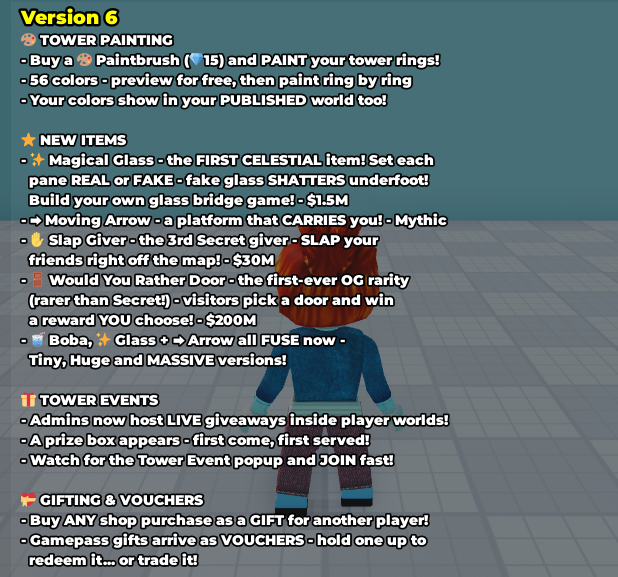
Version 6 added tower painting. A 15-Gem Paintbrush offered free previews and 56 colors, applied ring by ring. The selected colors also appeared in the player's published world, making painting part of the visitor-facing presentation.
The same update let admins host live giveaways inside player worlds. A prize box appeared first come, first served, and a Tower Event popup prompted players to join quickly. These are admin-driven events; the log does not say that ordinary players can schedule their own prize boxes.
Mailbox, introduced in Version 5 for 200 Gems, lets visitors leave mail. Would You Rather Door, introduced in Version 6 for $200M, lets visitors choose a door and potentially receive a reward selected by the owner. Use the live interface to confirm any spending or reward before publishing around these interactions.
What remains unpublished
The logs do not state a world limit per account, publication review rules, moderation timing, maximum visitor count, Featured ranking formula, like reset policy, or a guaranteed event schedule. They also do not prove that every historical item can be placed in every current published world.
For dated release details, see the Version 4 update and Version 6 update. When the live Worlds board differs from these logs, follow the current interface and record the new version before updating a historical claim.
Source
- Build an ASMR Tower in-game Update Logs (Versions 1–6.5)Checked Jul 21, 2026
Keep exploring
Related Wiki pages
Continue with connected wiki pages using the same reference map.