
Build an ASMR Tower Crafting Guide
Use the Crafting Bench with blocks and cash, review the published craftable outputs, and plan doors, ladders, signs, fences, and other route pieces.
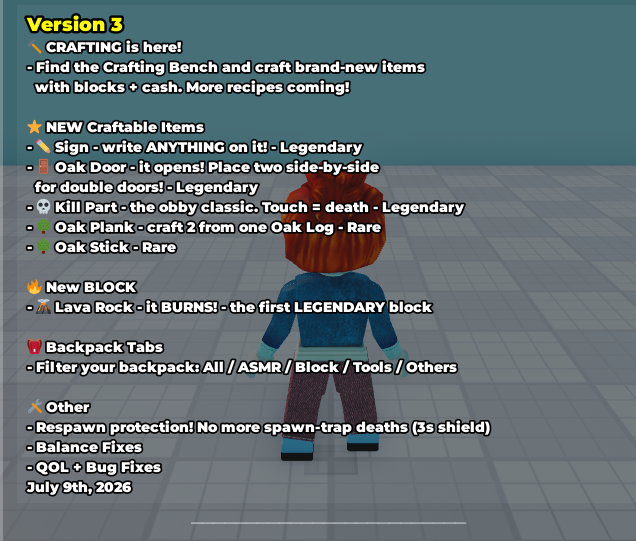
Version 3 introduced the Crafting Bench. Its core flow uses blocks and cash to make new items.
How Crafting works
The Version 3 update introduced the Crafting Bench and says that blocks plus cash create new items. Use that released Crafting system as the material-planning part of a tower session. The craftable item list below gathers the outputs named across the Version 3, Version 4, and Version 5 logs, so you can decide which published pieces fit the route you want to build.
Start with a route idea rather than an assumed interface sequence. A builder can plan an entrance, a direction marker, a boundary, and a vertical section on paper or in a low test area, then match those goals to the published craftable outputs. For repeated wood construction, the Oak Plank conversion gives the one published quantity ratio needed for a small batch calculation. The Version 3 Backpack filter names can then support an organized building routine.
This is a straightforward planning loop: choose the route purpose, review the named craftables, calculate Oak Planks when they are part of the plan, and keep materials and finished pieces organized as you build. The advice concerns how to prepare a tower; the published Crafting facts are the bench, blocks and cash, the named outputs, the Oak Plank ratio, and the five Backpack filters.
Craftable item list
The update logs name the following craftable items. This table keeps the release version and published detail together so a builder can plan with the documented item roles.
| Craftable output | Introduced | Published detail |
|---|---|---|
| Sign | Version 3 | Legendary; players can write anything on it. |
| Oak Door | Version 3 | Legendary; opens; two placed side by side form double doors. |
| Kill Part | Version 3 | Legendary; causes death on touch. |
| Oak Plank | Version 3 | Rare; 1 Oak Log → 2 Oak Planks. |
| Oak Stick | Version 3 | Rare. |
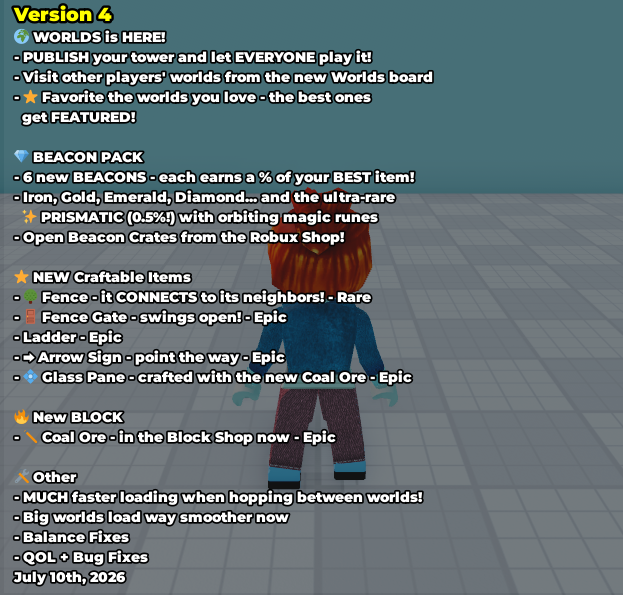
| Fence | Version 4 | Rare; connects to neighboring fences. |
| Fence Gate | Version 4 | Epic; swings open. |
| Ladder | Version 4 | Epic. |
| Arrow Sign | Version 4 | Epic; points the way. |
| Glass Pane | Version 4 | Epic; crafted with Coal Ore. |
| Boba | Version 5 | Craftable Boba. |
Version 4 update added Fence, Fence Gate, Ladder, Arrow Sign, and Glass Pane to the released Crafting list. Version 5 update later listed Boba as craftable. These additions give a tower planner more named pieces to consider alongside the Version 3 set.
Oak Plank recipe
The published Oak Plank conversion is 1 Oak Log → 2 Oak Planks. In plain planning terms, one Oak Log crafts two Oak Planks. That ratio supports simple material calculations when a tower section calls for repeated planks.
For eight Oak Planks, plan four crafts and four Oak Logs. For nine Oak Planks, plan five crafts and five Oak Logs; those crafts produce ten Oak Planks, leaving one extra. For ten Oak Planks, plan five crafts and five Oak Logs. For any target, divide the desired plank count by two and round up to the next whole number of crafts and Oak Logs. This gives a clear checkpoint before laying out an entrance, floor, or transition.
Oak Planks can be planned alongside other released route pieces. If a section is intended to include a Sign, Oak Door, Fence, or Ladder, work out the Oak Plank amount first and keep the rest of the build list short and focused. The ratio is especially helpful when the same wood pattern repeats across several low test sections before the tower grows upward.
Backpack tabs
Version 3 added five Backpack filters: All, ASMR, Block, Tools, and Others. Use All as the starting view, then narrow to a named filter as an organization habit while preparing materials, tools, and finished pieces for a build. The released tab names give a compact way to divide a long inventory into smaller checks.
For example, a builder can review Block while planning the material side of a Crafting session, then return to All and use the remaining named filters to organize the next stage of the build. This is a planning suggestion based on the available filter names, not a permanent category map for individual craftables. Keeping a short build list beside the tab names makes it easier to move from materials to placement without losing the route plan.
The same routine helps when a project mixes ordinary construction with interactive pieces. Keep raw blocks, tools, and the pieces intended for the next route segment mentally separated, then narrow the Backpack view only when it helps locate that group. The goal is a cleaner preparation habit while preserving the published Version 3 filter names.
Building with craftables
Use the published item details to shape a route plan. Doors and Fence Gates can be planned as entrances and transitions because the published details say that Oak Doors open and paired doors form double doors, while Fence Gates swing open. Consider Ladders as vertical-route pieces in the plan, then test that section low to the ground before extending the same idea higher.
Arrow Signs point the way, so they can be planned at turns where a visitor needs direction. Signs can carry player-written messages, which makes them useful to consider for labels or instructions. Fences connect to neighboring fences; plan them as boundaries where a repeated edge will help the route read clearly. Consider Glass Panes for glass details, while keeping their published Crafting detail in view: they are crafted with Coal Ore.
Kill Parts cause death on touch, so consider them as hazards only after testing their route section at a safe height. A low test pass is a general building recommendation: test one entrance, turn, climb, marker, boundary, or hazard area first, then extend the pattern when it serves the route. For broader structure-first planning, use the tower-building guide. The item catalogue combines the official item ledger with a gameplay shop snapshot for wider item context.
Crafting FAQ
What is the Crafting Bench?
Version 3 introduced the Crafting Bench. The update says that blocks and cash create new items through Crafting.
What does Crafting use?
Crafting uses blocks and cash to create new items, as stated in the Version 3 update.
What is the Oak Plank recipe?
The published conversion is 1 Oak Log → 2 Oak Planks. Eight Oak Planks need four crafts and four Oak Logs; ten Oak Planks need five crafts and five Oak Logs.
Which Backpack tabs help with organization?
Use All, ASMR, Block, Tools, and Others. Start in All, then narrow the view to support an organized materials, tools, and route-piece plan.
Which crafted pieces can be planned for tower routes?
Consider Doors and Fence Gates for entrances and transitions, Ladders for vertical sections, Arrow Signs for direction, Signs for messages, Fences for boundaries, Glass Panes for glass details, and Kill Parts for hazards. Test a low route section before extending it upward.
Source
- Build an ASMR Tower in-game Update Logs (Versions 1–6.5)Checked Jul 21, 2026
Keep exploring
Related Wiki pages
Continue with connected wiki pages using the same reference map.